
1,000 emails a day.... Here's a simple way to manage some important emails.
Customer of mine had this problem. The boss gets 10,000 emails a day. And a new process made it to where they REALLY needed to pay attention to emails from a single company.
I built a bespoke Power App to handle this.
Simple Email Notification App:
Workflow:
- Email comes in from "important@example.com"
- Power Automate sends a notification to the customer's cell phone.
- Customer clicks the notification, which opens a Power App.
- Power App displays a list of emails filtered by the criteria "important@example.com"
- Customer clicks the button in the app, which opens the email in their browser so they can quickly answer it.
In this example application the filter criteria is just the "subject" line. You can input any number of criteria to filter by.
Add the 'Office365Outlook' connector:
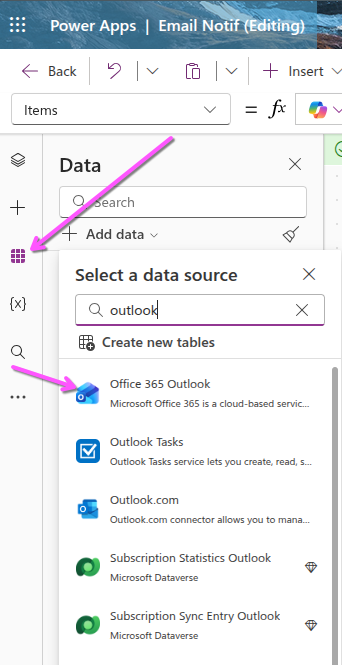
Power Automate push notifications:
- Create a new "Automated cloud flow"
- Make the trigger: "When a new email arrives (V3)"
- Add the filter criteria (in my case I just filtered by a subject)
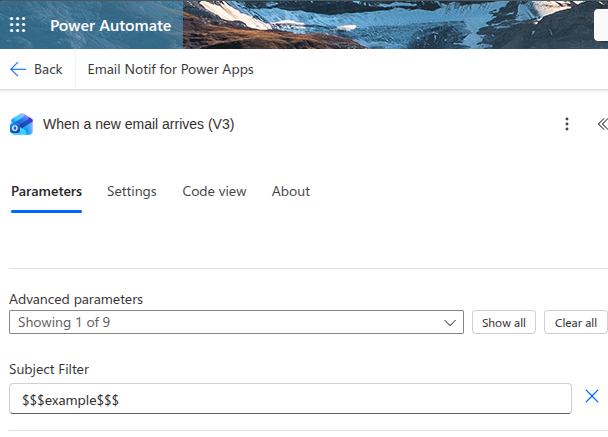
- Add the filter criteria (in my case I just filtered by a subject)
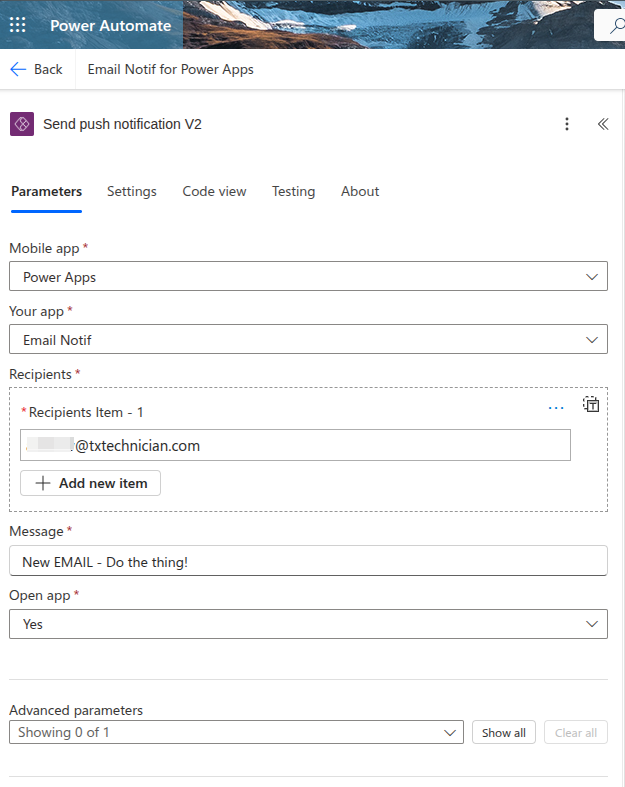
- Add the action: "Send push notification V2"
- Input the emails you want notifications to go to (this is a push notification to a mobile device, the email is specify which "logged on users" you want the push to go to.
- Input the rest of the criteria:
Start writing here...